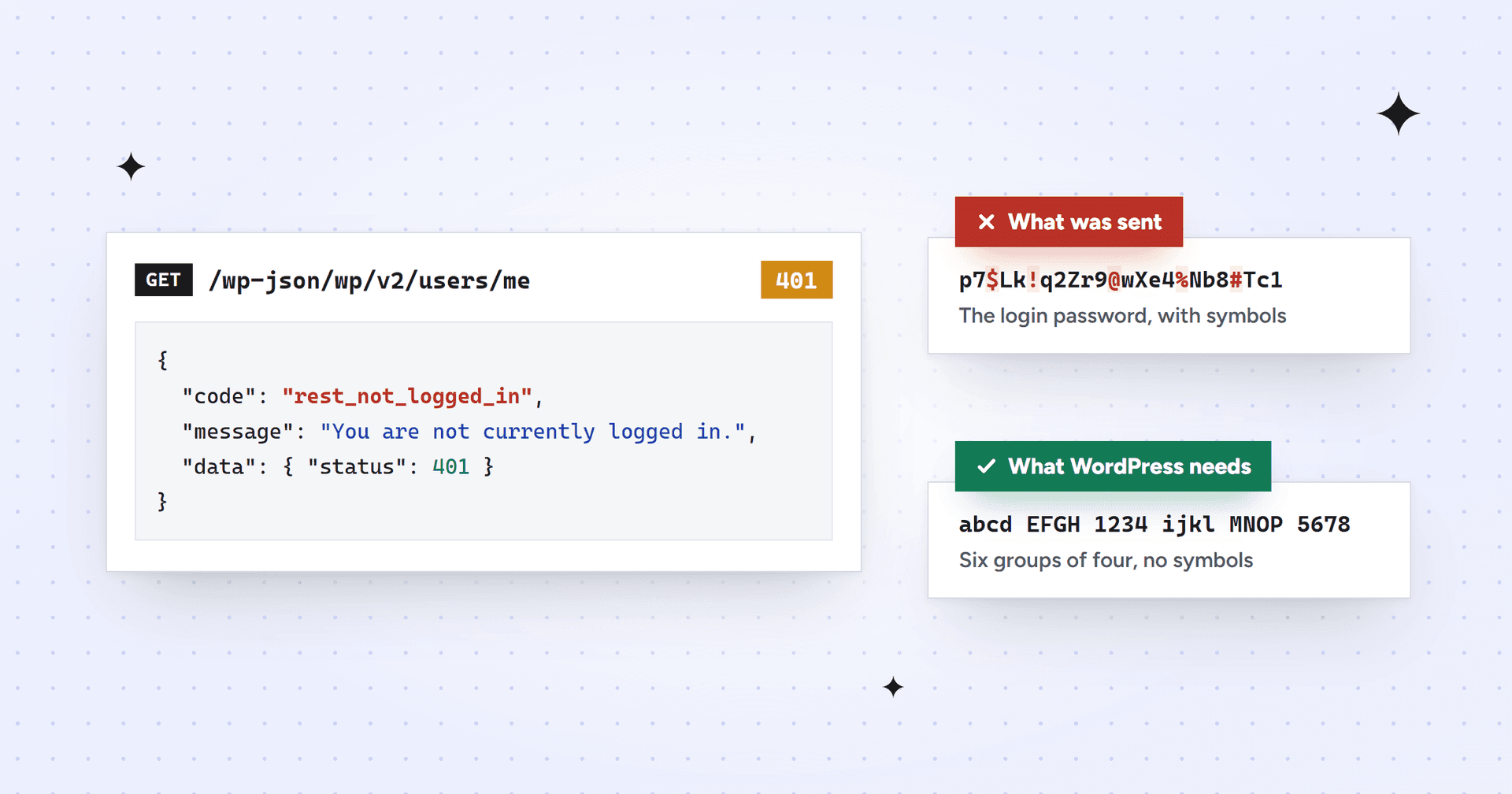
rest_not_logged_in is the error WordPress returns, with a 401 status and the message "You are not currently logged in.", when a request to /wp-json/wp/v2/users/me arrives without a login WordPress accepts. If you're sending an application password, check the password before the server: it should be 24 letters and numbers, created under Users > Profile > Application Passwords. Then test a fresh one on a second account. Only if both fail is your host worth a support ticket.
We got this the other way round. In October 2026 we were connecting Claude to a B2B SaaS client's WordPress site, hosted on WP Engine, and every authenticated request came back anonymous. We were sure the server was dropping the login, and this is what we told WP Engine's support chat:
GET /wp-json/wp/v2/users/me → 401 rest_not_logged_in. GET /wp-json/wp/v2/types/post?context=edit → 401 rest_forbidden_context. A wrong password also returns these same anonymous errors instead of incorrect_password, so the Authorization header isn't reaching PHP.Our message to WP Engine support, October 2026
We asked them to add a header passthrough rule and purge the cache. Their engineer asked us to try one thing first: create an application password on a different administrator account and send the same request. It worked straight away. The server had been passing the header all along. The password we'd been pasting for our claude-mcp account was that account's login password, which can never pass this check.
What rest_not_logged_in means
Only one REST endpoint returns this code. /wp/v2/users/me asks "who am I?", and when WordPress has no current user it answers rest_not_logged_in with a hard-coded 401. The request reached WordPress fine; WordPress just couldn't match it to an account.
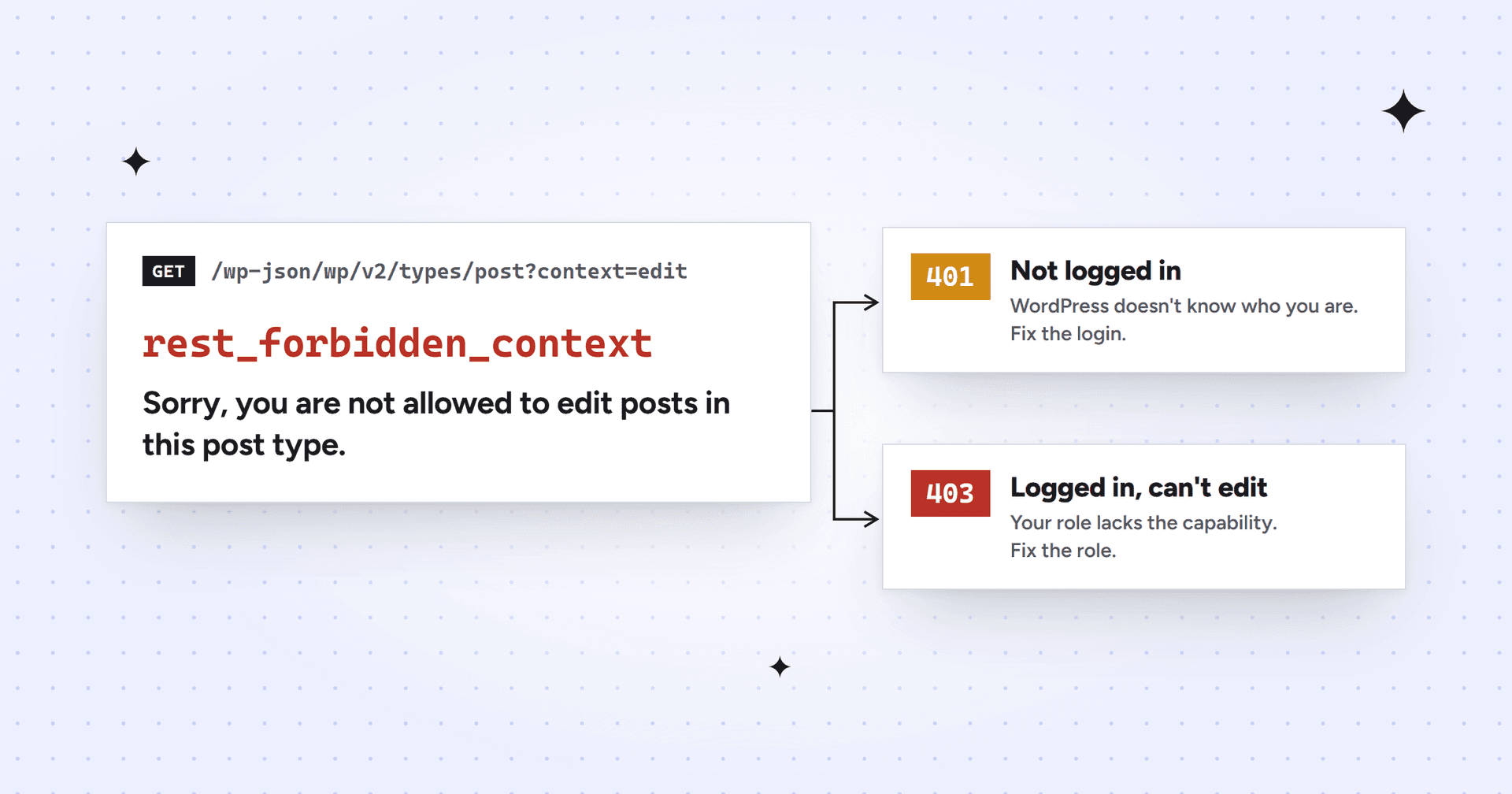
Other endpoints describe the same anonymous request in their own words, which is why one login problem can look like several different errors:
Request
What an anonymous request gets
GET /wp-json/wp/v2/users/me
401 rest_not_logged_in, "You are not currently logged in."
GET /wp-json/wp/v2/types/post?context=edit
401 rest_forbidden_context, "Sorry, you are not allowed to edit posts in this post type." (explained here)
POST /wp-json/wp/v2/posts
401 rest_cannot_create, "Sorry, you are not allowed to create posts as this user." (source)
/wp-json/mcp/mcp-adapter-default-server
401 rest_forbidden, "Sorry, you are not allowed to do that."
The first two rows are exactly what our client's site returned, from one failed login. Fix the login and they all go away together.
Why you get rest_not_logged_in instead of incorrect_password
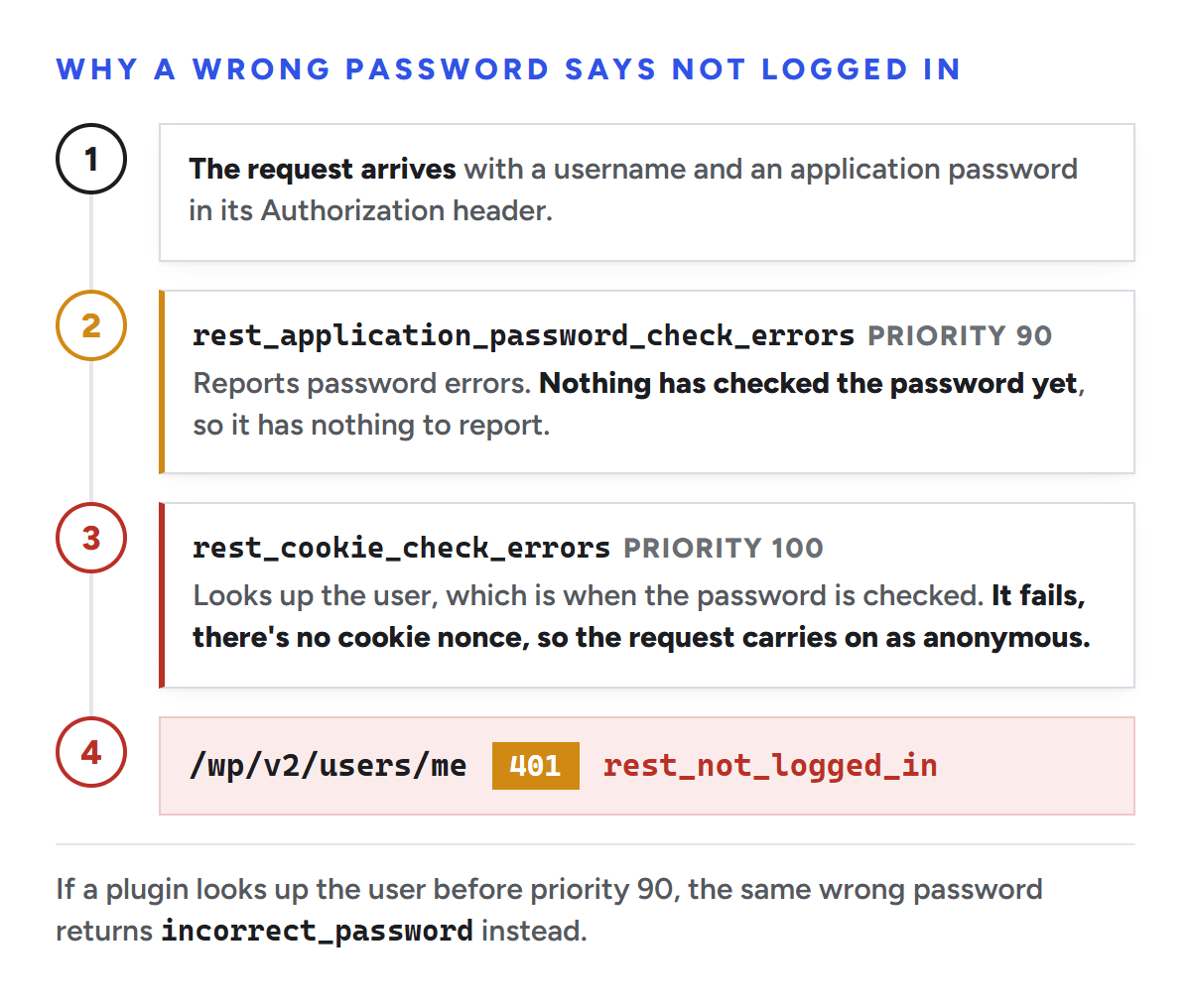
This is the part we got wrong. WordPress does have specific login errors for application passwords, such as incorrect_password ("The provided password is an invalid application password.") and invalid_username. We assumed that if the header arrived, a wrong password would always produce one of them. It doesn't.
In WordPress's own code, the step that reports application password errors runs at priority 90 of the REST authentication filter, and the step that looks up the user runs at priority 100 (source). On a standard site the password is only checked during that later step, after the reporting step has already passed with nothing to report. The request then carries on as anonymous, and /users/me says rest_not_logged_in. Some plugins look up the user earlier in the request, and on those sites you do see incorrect_password.
In WordPress 7.1.3's code, the password is checked after the step that reports password errors.
We tested this with an invented username and password against our client's site and four other public WordPress sites. Four of the five answered with the generic error; one said "Unknown username." A deliberately wrong password for the client's real account got the generic error too. So a fake-login test can't tell you whether the header arrives. A real application password on a second account can.
Causes of rest_not_logged_in, in the order to check them
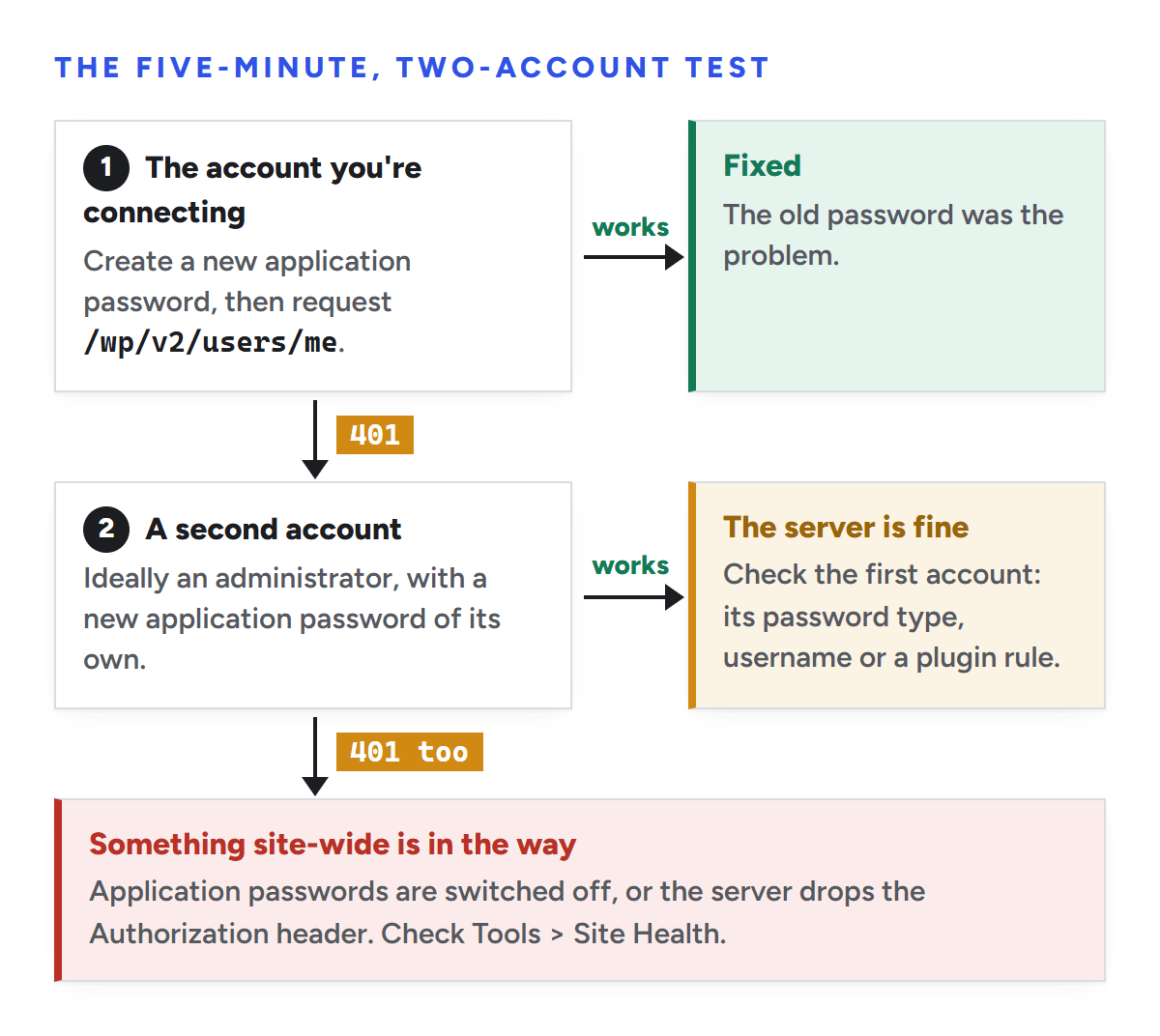
This is the test that settled our case. You need an administrator login and a terminal (Terminal on a Mac, PowerShell on Windows).
On the account you're connecting, go to Users > Profile > Application Passwords, type a name such as test and click Add New Application Password. Copy the password.
Send one request with that username and password, using the command below. A working login returns the account's details as JSON, starting with "id".
If that fails, open a second account (ideally an administrator) under Users > All Users, create an application password on its profile, and repeat the request with that username.
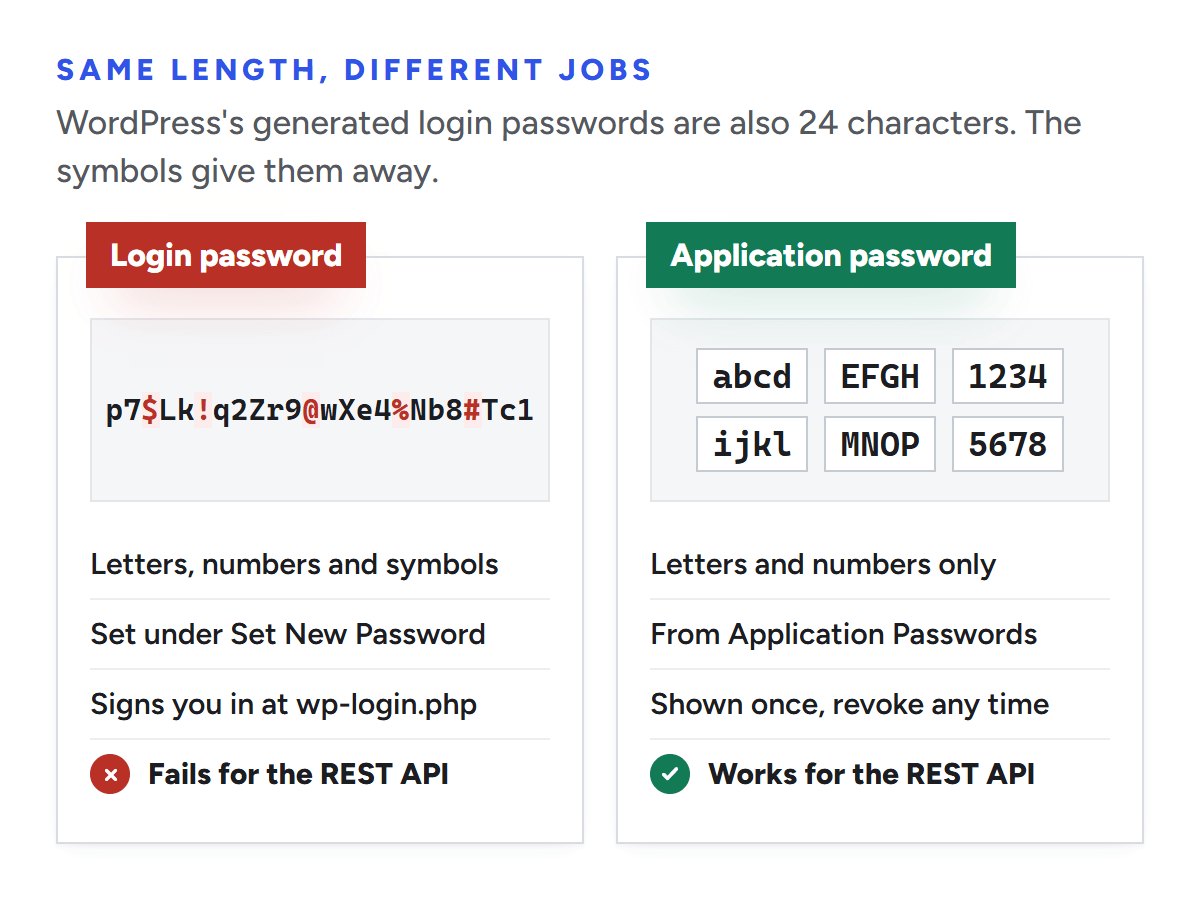
Six groups of four letters and numbers, like abcd EFGH 1234 ijkl MNOP 5678
What it works for
Signing in at wp-login.php
REST API and XML-RPC requests
Shown again later?
You can set a new one any time
No. WordPress shows it once
Spaces don't matter: WordPress strips everything that isn't a letter or number before checking. Our tell was a $ sign. When the password we'd been using ended up on screen by accident, it had a symbol in it, and application passwords never do.
To create one, open the account's profile, scroll to Application Passwords, type a name such as Claude MCP and click Add New Application Password. Copy it straight away; WordPress warns you won't be able to retrieve it later. The Last Used column fills in the first time a tool logs in with it.
Both can be 24 characters long. Symbols mean it's a login password.
Switch application passwords back on
If there's no Application Passwords section, WordPress ignores Basic logins entirely, so every request is anonymous. A quick check needs no login: open https://example.com/wp-json/ and search for application-passwords. If it appears under authentication, the feature is on. If not, the usual reasons are:
Wordfence. Its "Disable WordPress application passwords" setting is on by default, and profiles then say "Application passwords have been disabled by Wordfence." Signed in as an administrator, click Edit Wordfence Options under that message: it opens Wordfence's firewall options at the setting, where you can untick it. Our client's site had it unticked already.
A server password in front of the site, common on staging. WordPress then shows "Your website appears to use Basic Authentication, which is not currently compatible with Application Passwords." (source).
Fix the server only if Site Health says the header is missing
Tools send the login in a header called Authorization. WordPress tests it from Tools > Site Health by sending a dummy login from your browser. A failure shows "The authorization header is missing" (or "invalid") under recommended improvements; a pass shows "The Authorization header is working as expected" under Passed tests.
Our client's Site Health had no warning about the header. We read past it, assuming the browser test didn't count. It did: it was telling us the header arrived.
If the test does fail on Apache, look in .htaccess for RewriteRule .* - [E=HTTP_AUTHORIZATION:%{HTTP:Authorization}], which WordPress has written into its rules since 5.6. Re-saving Settings > Permalinks puts it back if the file is writable. Failing that, the line we asked WP Engine to add goes near the top of .htaccess, above # BEGIN WordPress, using mod_setenvif:
On Nginx, request headers reach PHP by default, and WordPress reads them from HTTP_AUTHORIZATION. If yours doesn't, the other line we sent WP Engine, fastcgi_param HTTP_AUTHORIZATION $http_authorization;, belongs in the server configuration, which managed hosts change for you.
What to send your host if it really is the server
Our message to WP Engine had the right error codes and the wrong conclusion. If both accounts fail and Site Health flags the header, send the evidence instead of the theory:
Requests with valid application passwords for two different users return 401 rest_not_logged_in from /wp-json/wp/v2/users/me. Site Health reports "The authorization header is missing." Can you pass the Authorization header through to PHP for this install?A template you can adapt
Next steps
Once /users/me returns your account, check its role. Edits that fail with a 403 are a permissions problem, covered in our rest_forbidden_context guide.
If you'd rather hand the site-wide changes to someone else, Mission SEO's technical SEO team makes most fixes inside your stack, from internal links to structured data.
Frequently asked questions
What does rest_not_logged_in mean in WordPress?
It means a request to /wp-json/wp/v2/users/me reached WordPress, but WordPress found no logged-in user, so it returned 401 with "You are not currently logged in." With an application password, the login wasn't accepted: usually the wrong kind of password, application passwords switched off, or a server dropping the Authorization header.
Does rest_not_logged_in mean the Authorization header is missing?
Not necessarily. A missing header causes it, but so does a wrong password, a disabled feature or a redirect, and on many sites they all return the same error. Check Tools > Site Health: if "The Authorization header is working as expected" is under Passed tests, the header arrives and the problem is elsewhere.
Why doesn't WordPress return incorrect_password?
WordPress only reports incorrect_password if it checked the password before deciding how to answer. On a standard site, that check happens slightly later in the request, so a wrong password ends up treated as no login at all. Some sites run plugins that check earlier, and those do return incorrect_password.
Can I use my normal WordPress password for the REST API?
No. WordPress's REST API accepts application passwords for this kind of login, not the password you use at wp-login.php. Create one under Users > Profile > Application Passwords. It's 24 letters and numbers in groups of four, and you can revoke it at any time without changing your normal password.
Sources
We checked every source below on October 20, 2026, against WordPress 7.1.3 and the current WordPress development code. Plugin menus change, so trust your own screens if something here doesn't match.
We’re a B2B SEO and AEO agency. Book a free 30-minute call with a senior consultant: we look at your site before we talk, so you leave knowing what to fix first.


 best project management software