“Claude Couldn’t Reach Claude in Chrome”: What Causes It and How to Fix It
By Mission SEO staff
· 10 min read
At 3 a.m. on a Monday, I asked Claude to open a client’s Google Tag Manager container in my browser so we could check which tags were live. Instead of a new tab, I got this:
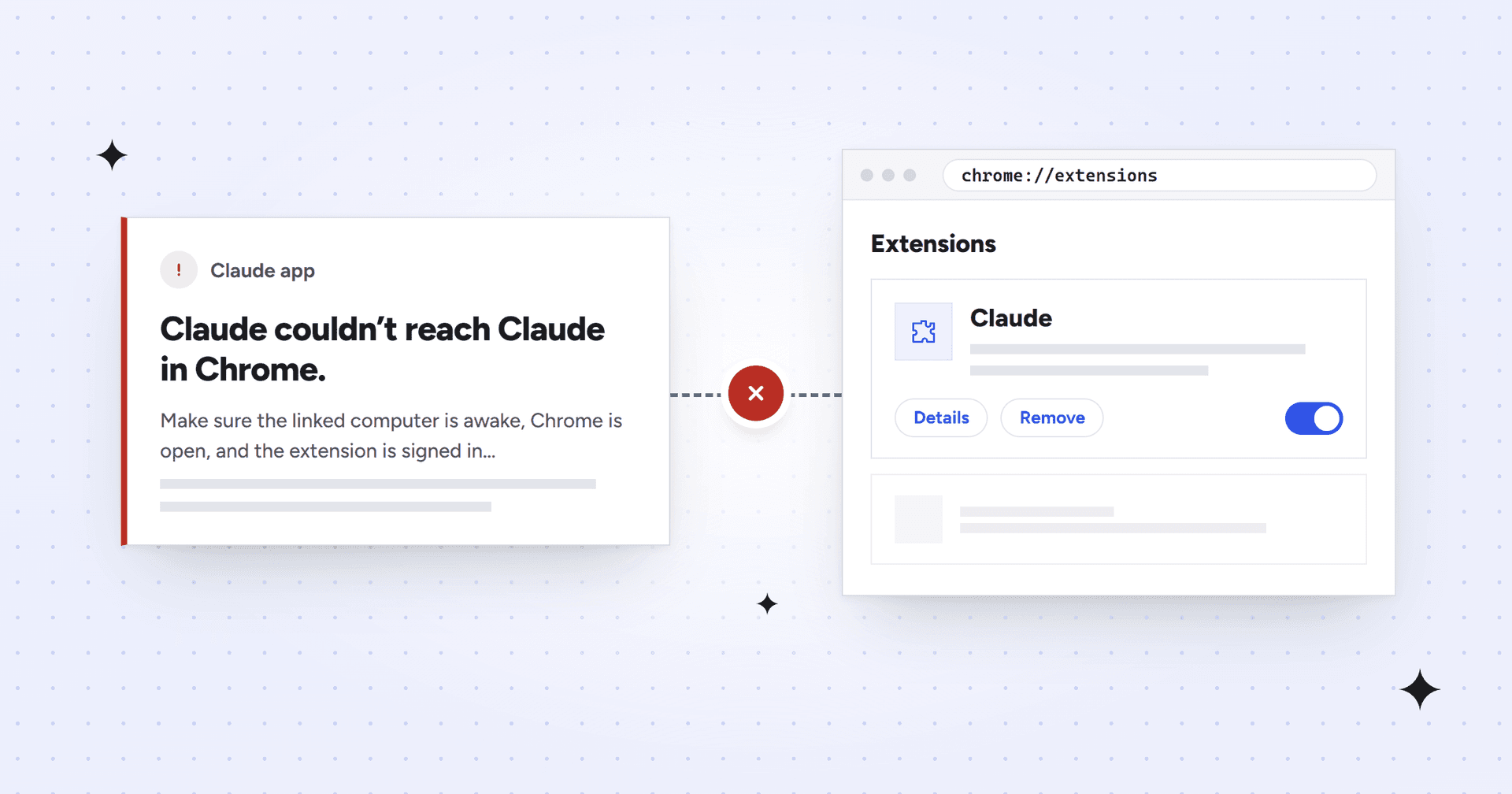
Claude couldn’t reach Claude in Chrome. Make sure the linked computer is awake, Chrome is open, and the extension is signed in and not waiting on a prompt, then ask Claude to try again. If that doesn’t fix it and you’re in more than one organization, log out in the extension’s settings, then log in and select the organization you’re using here. Logging out erases the shortcuts and scheduled tasks saved in the extension.The error message in the Claude app
Chrome was open. The extension was signed in. Asking Claude to try again changed nothing. What finally fixed it was removing the extension, reinstalling it, and signing back in to the right Claude organization. I’d been signed in to the wrong one.
That’s one cause. The error covers a few more, and it leaves out the one that has cost other people the most time: antivirus software that inspects HTTPS traffic. Below is the fix that worked for me, then everything else we found.
The fix: reinstall the extension and sign in again
To fix “Claude couldn’t reach Claude in Chrome”, remove the Claude extension, reinstall it, and sign back in to the same organization you use in the Claude app. It deals with two causes at once: an extension stuck in a bad state, and a sign-in to the wrong organization.
These are the steps that fixed it for me:
Go to chrome://extensions, find Claude, and click Remove.
Pin it from the puzzle-piece menu, open the side panel, and sign in.
When it asks which organization to use, choose the one the Claude app uses.
Go back to Claude and ask it to try again.
Before you remove it: Removing the extension wipes its local data, including the shortcuts and scheduled tasks saved in it, so copy out any prompts you’d hate to lose.
If Claude still can’t reach Chrome after a clean reinstall, the sections below cover every other cause we found, in the order we’d check them.
How Claude actually reaches your browser
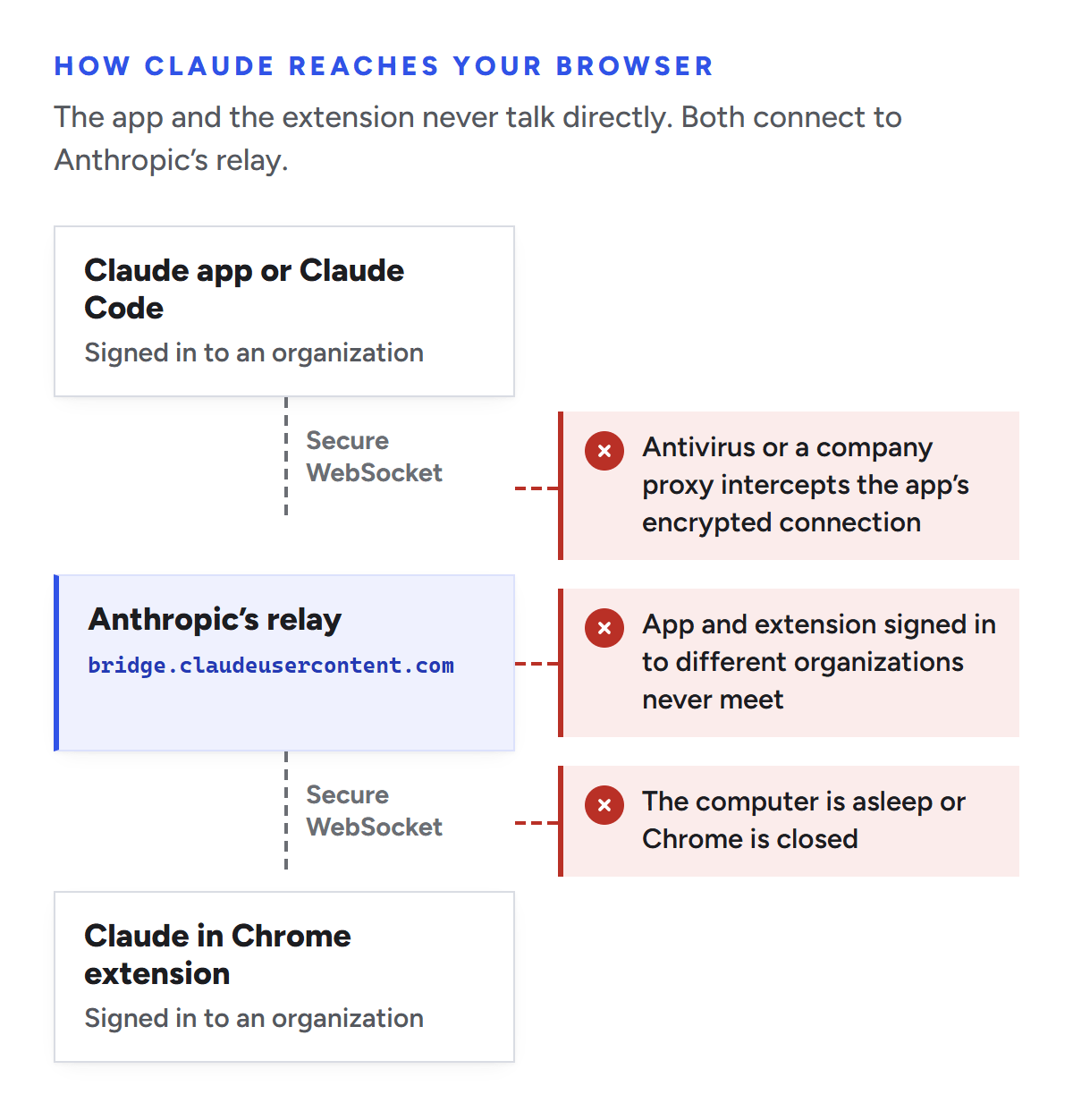
Claude in Chrome isn’t wired straight into the Claude app. The extension and Claude (the desktop app, Claude Code, or a Claude session linked to your computer) each open a secure WebSocket connection to an Anthropic relay at bridge.claudeusercontent.com, and commands pass through it. Anthropic’s network requirements list that host as the Claude in Chrome extension’s WebSocket bridge, and Bay Security’s teardown of the extension describes the same relay.
That design explains almost every version of this error:
If the computer running Chrome goes to sleep or Chrome closes, the extension drops off the relay.
Each side joins under the organization it’s signed in to. An extension signed in to your personal organization and an app using your company’s never find each other.
Anything that tampers with the encrypted connection to the relay, like antivirus HTTPS scanning or a company proxy that inspects traffic, can make one side refuse to connect while everything else looks fine.
The app and the extension never talk directly. Both connect to Anthropic’s relay, and the error appears when either side can’t.
1. Check the basics the error lists
If a reinstall didn’t do it, run through the quick checks:
Wake the computer that runs Chrome and make sure Chrome is open. If you use Claude from your phone or another computer, the machine with Chrome is the one that matters.
Use the Chrome profile the extension is installed in. Extensions are installed per profile, so a Chrome window signed in to a different profile won’t have it.
Open the side panel and answer anything waiting there. Click the Claude icon in Chrome’s toolbar, or pin it from the puzzle-piece menu if you can’t see it. A pending connection request or permission question can hold everything up.
Check that the extension is switched on at chrome://extensions.
In the desktop app, check the Claude in Chrome toggle under Settings > Connectors. Anthropic’s troubleshooting guide says to restart or update the desktop app if that toggle won’t stay on.
Use Google Chrome itself. Anthropic’s help center says the extension isn’t supported in other Chromium browsers, and people running Brave, Arc and Vivaldi have reported that the relay connection never comes up (GitHub issue #34364).
Two account checks while you’re there. Claude in Chrome needs a paid plan (Pro, Max, Team or Enterprise). On Team and Enterprise plans, an Owner can switch it off for everyone under Organization settings > Claude in Chrome (admin controls), so ask your admin if nothing else works.
2. Sign in to the same organization as the Claude app
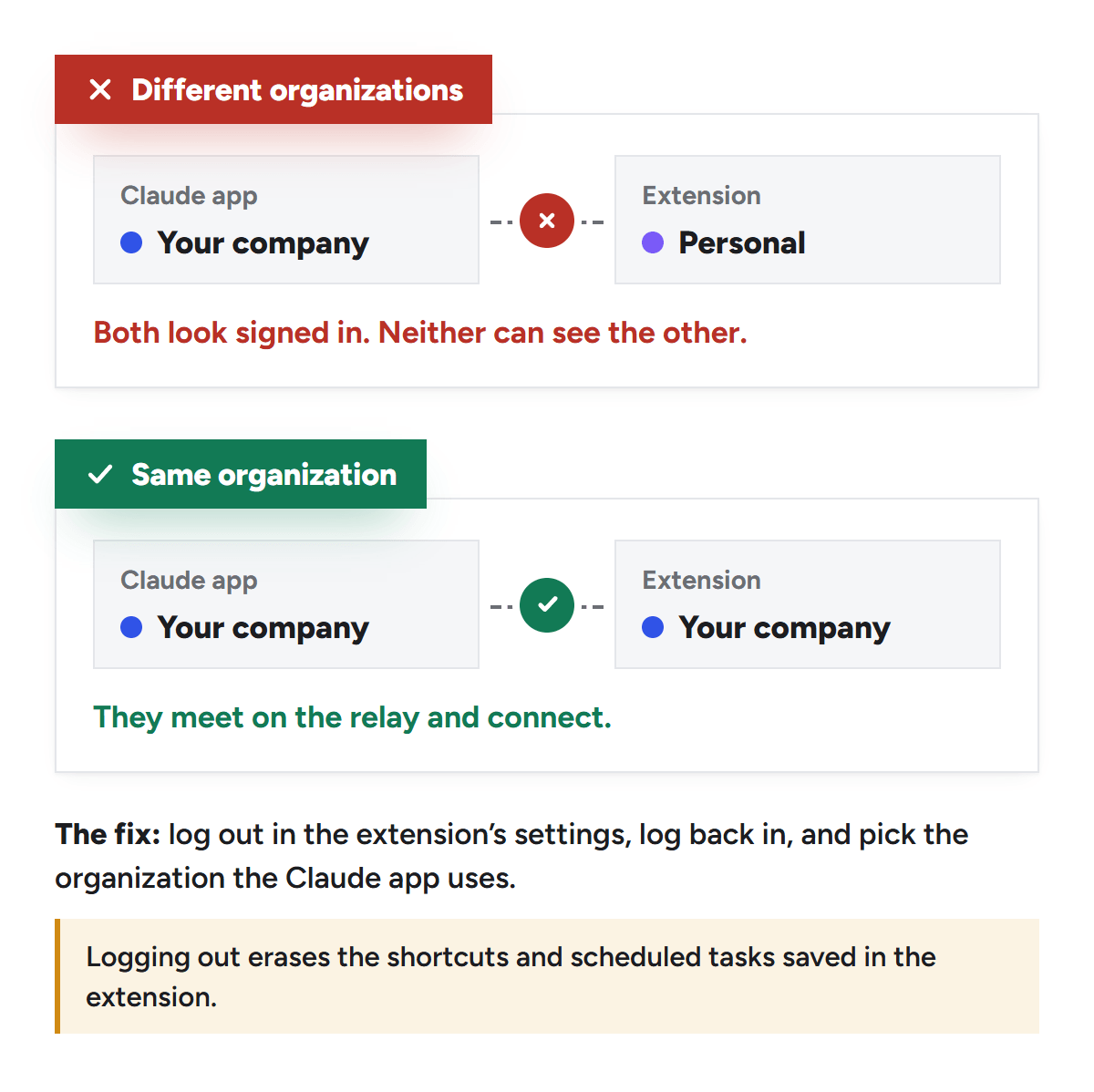
This was my problem. If you belong to more than one Claude organization, say a personal account and your company’s Team plan, the extension and the app can end up in different ones. Both look signed in, and neither can see the other.
The fix is in the error message itself: log out in the extension’s settings, log back in, and pick the organization you’re using in the Claude app. If you’re not sure which one that is, check the organization shown in the app’s account menu before you start.
Signed in to different organizations, the app and the extension both look fine and never find each other.
Before you log out: The same error message warns that logging out erases the shortcuts and scheduled tasks saved in the extension. Copy out any prompts you’d hate to lose.
3. Check whether antivirus or a work network is intercepting the connection
If the side panel works but the Claude app keeps saying it can’t reach Chrome, look at your security software. One user on the ClaudeAI subreddit said they spent hours on this before tracing it to their antivirus, and there’s a detailed report of the same failure on Windows 11 in GitHub issue #58388.
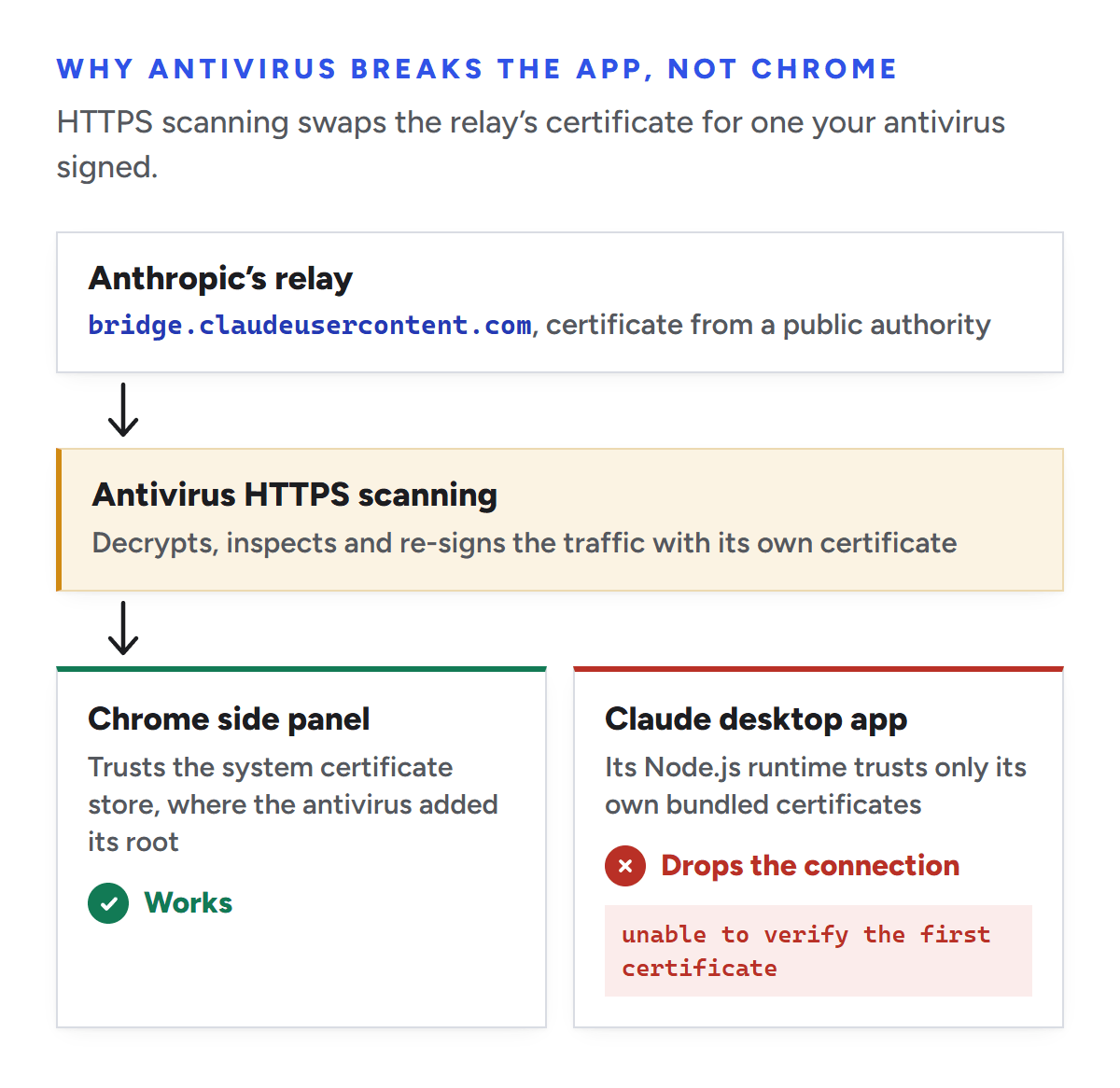
Antivirus products with HTTPS scanning, such as Bitdefender, Kaspersky, ESET and Avast, decrypt your traffic, inspect it, and re-encrypt it with a certificate they sign themselves. Your browser accepts that certificate because the antivirus adds its own root certificate to Windows. Node.js doesn’t look there: by default it trusts only the root certificates bundled with it and ignores the operating system’s store (Node.js docs). The desktop app connects to the relay from Node.js, so it sees a certificate from an issuer it doesn’t recognize and drops the connection. Meanwhile the side panel, which runs inside Chrome, carries on as normal.
Antivirus HTTPS scanning re-signs the relay’s certificate. Chrome trusts the new one, and the desktop app’s Node.js runtime doesn’t.
Claude Code, the command-line tool, is less exposed. Anthropic’s docs say it trusts both its bundled certificates and your operating system’s certificate store by default, as long as you use the native installer or Node 22.15 or later (network configuration).
Look for the error in the app’s logs
The desktop app writes logs to %APPDATA%\Claude\logs on Windows and ~/Library/Logs/Claude on a Mac (MCP debugging docs). On Windows, run this in PowerShell:
The second folder covers installs from the Microsoft Store package, because Windows can keep a packaged app’s AppData files in a private, per-app location (Microsoft explains how). On a Mac, run this in Terminal:
A certificate problem looks like this line from the GitHub report:
[Claude in Chrome] Bridge WebSocket error after 84ms: unable to verify the first certificate
In that report, the log line goes on to suggest running Node.js with --use-system-ca. If yours does the same, you’ve found the cause.
See who signed the certificate
This shows which certificate your machine actually gets back from the relay. It only reads the certificate and doesn’t send anything else. In PowerShell:
The issuer should be a public certificate authority. In the May 2026 GitHub report, the genuine certificate came from Google Trust Services (WE1). Certificate authorities change over time, so don’t treat that exact name as the only right answer. If the issuer names your antivirus or your employer, though, the connection is being intercepted.
A clean result doesn’t completely clear your antivirus. Some products only inspect traffic from certain programs, so PowerShell might get the real certificate while the Claude app doesn’t. The log line is the better evidence.
Exclude Anthropic’s domains from HTTPS scanning
Don’t switch HTTPS scanning off for good. Add an exception for Anthropic’s domains instead. These come from Anthropic’s list of hosts the desktop app needs, and the first one covers the relay:
*.claudeusercontent.com
*.anthropic.com
claude.ai
If your antivirus doesn’t accept wildcards, enter the plain domain (claudeusercontent.com) or the relay host itself (bridge.claudeusercontent.com). Where to add the exception in the most common products:
ESET: press F5 for Advanced setup, then go to Protections > SSL/TLS. Add the Claude app under Application scan rules with its scan action set to Ignore, or switch off Enable SSL/TLS for a minute to confirm the cause (ESET’s guide).
Avast: Menu > Settings > General > Exceptions > Add exception, then the Website / Domain tab (Avast’s guide).
Then quit the Claude desktop app completely from the system tray or menu bar (closing the window isn’t enough), reopen it, and ask Claude to try again.
One thing not to spend time on: setting NODE_OPTIONS=--use-system-ca for the desktop app. The person who filed the GitHub report tried it, and nothing changed. The Reddit poster asked Anthropic to start the app’s Node runtime that way. Until it does, the antivirus exception is the fix you control.
On a company network
Corporate proxies that inspect TLS cause the same failure. Ask IT to exclude bridge.claudeusercontent.com from SSL inspection. If your company also restricts Claude with IP allowlisting, Anthropic says to route that host through the same proxy egress as claude.ai and api.anthropic.com, for example in the same Zscaler app segment or Netskope steering policy. Otherwise Claude in Chrome stops working while the rest of the app keeps going (network configuration).
Using Claude Code? Check these too
From the terminal, the error usually reads “Browser extension is not connected”, or /chrome shows the extension as “Not detected”. Anthropic’s Claude Code docs cover most of the fixes:
Run /chrome and choose Reconnect extension. The extension’s background worker goes idle during long sessions, and reconnecting wakes it.
Restart Chrome after you first turn the integration on. Claude Code installs a native messaging host file, and Chrome only reads it at startup.
Sign in with /login. If you authenticate with an API key or a claude setup-token token, Claude Code keeps Chrome integration off.
Update the extension to version 1.0.36 or later.
Pick the right browser. If more than one is connected, run /chrome and use Select browser to choose.
Know the limits. It doesn’t work in WSL, or if you only use Claude through Amazon Bedrock, Google Cloud or Microsoft Foundry.
Claude Code also works with Microsoft Edge, and its docs say it detects Brave, Arc, Vivaldi and Opera. On a Mac with both the desktop app and Claude Code installed, older versions could connect the extension to the wrong app (GitHub issue #33483). Update both before you try the workaround in that thread, because it breaks the desktop app’s Chrome connection.
Still stuck?
Update Chrome, the Claude app and Claude Code, then restart all three. If it still fails, contact Anthropic support and include the log lines from step 3. Claude Code bugs can also go on GitHub, where most of the reports linked above were filed.
Frequently asked questions
How do I fix “Claude couldn’t reach Claude in Chrome”?
Remove the Claude extension at chrome://extensions, quit and reopen Chrome, reinstall the extension, and sign back in to the same organization as the Claude app. That fixed it for me. If the side panel works but the app still can’t connect, check your antivirus’s HTTPS scanning next.
Why does the Claude side panel work when the app can’t reach Chrome?
They use different connections. The side panel talks to Claude from inside Chrome, which trusts your antivirus’s certificate. The app reaches the extension through Anthropic’s relay from its own Node.js runtime, which doesn’t, and it also has to be in the same organization as the extension. A working side panel rules out the extension itself, not the connection.
Does logging out of the Claude in Chrome extension delete anything?
Yes. Claude’s own error message warns that logging out erases the shortcuts and scheduled tasks saved in the extension. Removing the extension clears its local data too, so save anything you need first.
Does Claude in Chrome work in Brave, Edge or Arc?
For the Claude app, use Google Chrome. Anthropic’s help center says the extension isn’t supported in other Chromium browsers. Claude Code is more flexible: it supports Chrome and Edge, and its docs say it detects Brave, Arc, Vivaldi and Opera.
Is it safe to exclude Claude’s domains from antivirus scanning?
It’s a trade-off you control. The exception skips HTTPS inspection only for traffic to Anthropic’s domains, and everything else stays scanned, which is much narrower than turning HTTPS scanning off. If your company manages your antivirus, ask IT instead of changing it yourself.
Do I need a paid plan for Claude in Chrome?
Yes. Anthropic lists Pro, Max, Team and Enterprise. On Team and Enterprise plans, an Owner can also switch it off for the whole organization.
Why we wrote this
We use Claude in Chrome for client work every week: checking tag setups, reviewing live pages, and pulling numbers out of tools that don’t have an API. When it can’t reach the browser, that work stops, and the error message only gets you partway. If you’d like help putting Claude to work on your SEO, AEO or analytics, talk to the Mission SEO team.
We’re a B2B SEO and AEO agency. Book a free 30-minute call with a senior consultant: we look at your site before we talk, so you leave knowing what to fix first.

 best project management software