This week someone on our team opened our own blog, scrolled down, and said the page felt laggy. It wasn't broken, just a beat behind the mouse wheel, the way a page feels when it's working harder than it should.
The next question came fast, because it's one our clients ask us too: is that costing us rankings?
We spent most of a day measuring it frame by frame. This post is the long answer. Where Google has said something, we quote Google. Where it hasn't, we show you our own test numbers and say so.
What scroll jank actually is
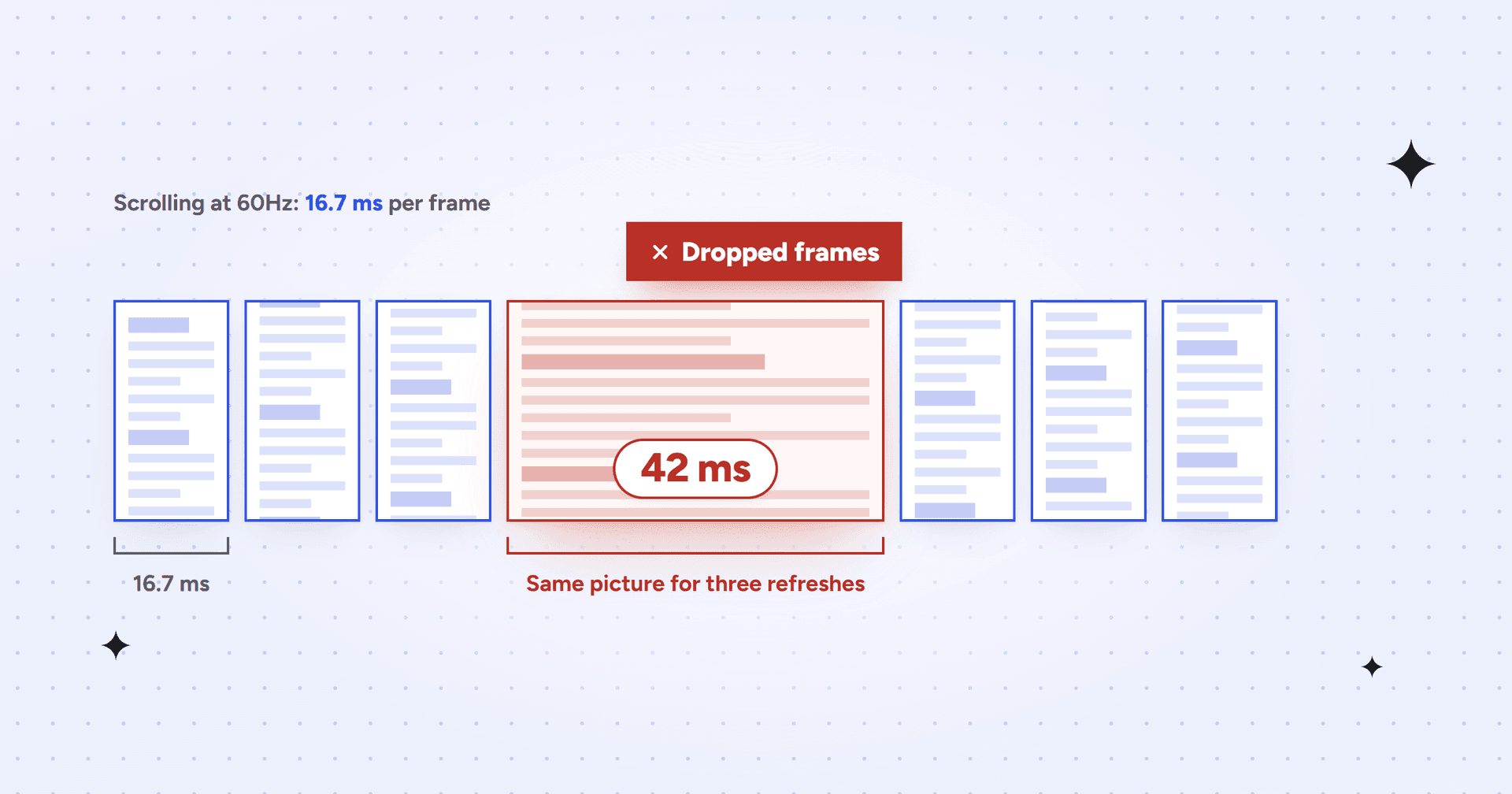
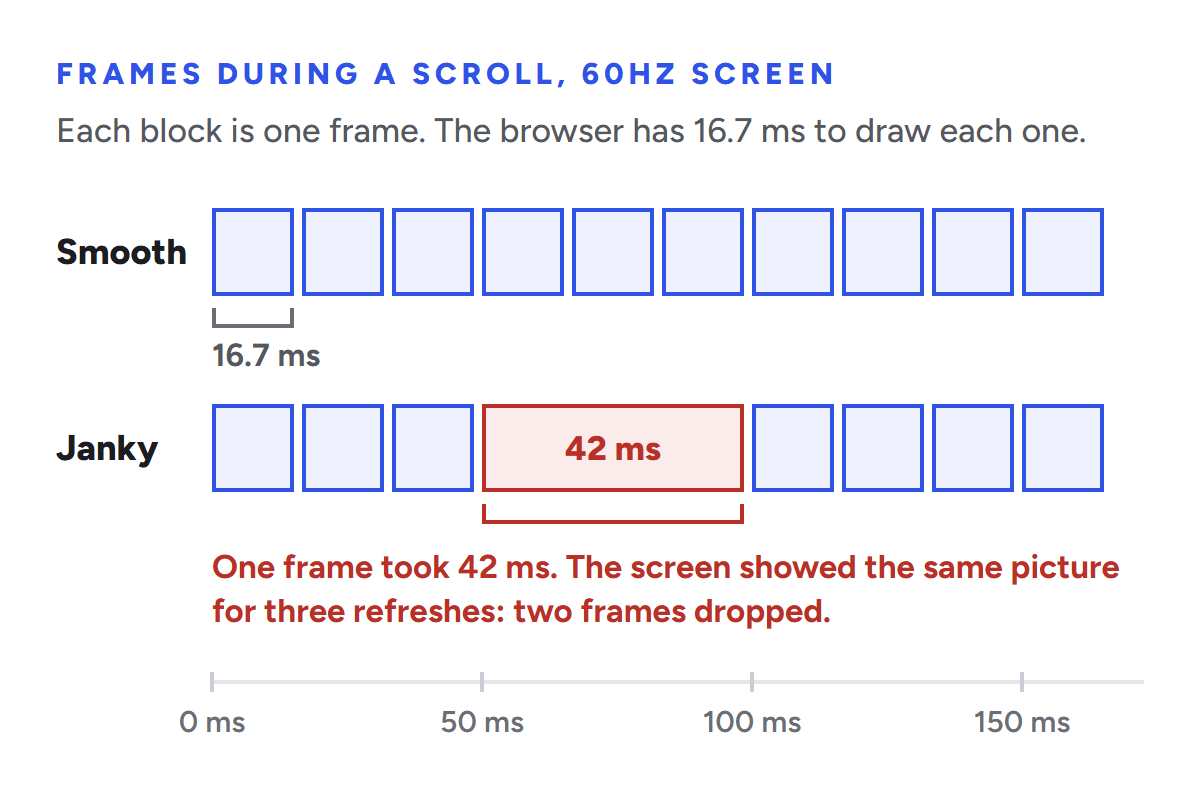
A screen redraws itself a fixed number of times per second. Google's guide to rendering performance puts it plainly: most devices refresh their screens 60 times a second, so the browser has 16.66 milliseconds to produce each frame, and really about 10 once the browser's own overhead is paid. Miss that window and, in Google's words, "page contents judder on-screen. This phenomenon is often called jank."
Newer screens make the budget tighter, not looser. A 120Hz phone gives you about 8.3 milliseconds per frame. A 240Hz gaming monitor gives you 4.2.
People use "scroll lag" and "jank" for two slightly different problems, and it helps to keep them apart:
Scroll lag is a delay before the page starts moving. You flick or turn the wheel, and for a moment nothing happens.
Jank is stutter while the page is moving. Frames get skipped, so the motion looks choppy instead of smooth.
Browsers work hard to keep scrolling smooth even when a page is busy. Chrome hands scrolling to a separate compositor thread, and as Mariko Kosaka explains in Chrome's Inside look at modern web browser series, that thread "does not need to wait on style calculation or JavaScript execution." When the page's layers are already drawn, "all it has to do is to composite a new frame."
Jank happens when something makes the compositor wait anyway. The classic culprit is a touch or wheel event listener. If the browser can't tell whether your listener will cancel the scroll, it has to run the listener first, on the main thread, before it can move the page (part 4 of the same series covers this). When Chrome's engineers proposed passive event listeners as the fix, they found that in Chrome for Android, 80% of the touch events that blocked scrolling never actually prevented it. Ten percent of those events added more than 100ms of delay before the scroll started, and 1% of scrolls waited at least 500ms (WICG explainer).
That particular problem is mostly solved now. Chrome started treating document-level touch listeners as passive by default, which brought the slowest 1% of scroll starts down from just over 400ms to about 250ms (Chrome for Developers, 2017). Lighthouse even dropped its passive listener audit in version 13 because, as the release notes put it, it's "rarely an issue in first-party scripts these days" (What's new in Lighthouse 13). Today the usual suspects are elsewhere: expensive painting (big blurs, filters, complicated gradients), scroll handlers that do real work on every event, and anything that changes the layout while the page is moving.
What Google actually measures
Google is clear that page experience matters, and just as clear that it isn't one number. From its page experience documentation: "Core Web Vitals are used by our ranking systems." And a little further on: "There is no single signal."
Core Web Vitals are three metrics, collected from real Chrome users through the Chrome UX Report. Search Console's Core Web Vitals report uses the last 28 days of that field data, and a group of pages is rated by the experience of the 75th percentile of visits.
Metric
What it measures
Good
Does scrolling count?
Largest Contentful Paint (LCP)
Loading: when the biggest piece of content appears
2.5 seconds or less
No. It's about the initial load.
Interaction to Next Paint (INP)
Responsiveness to clicks, taps and key presses
200 ms or less
No. Hovering, zooming and scrolling "are not observed for the purposes of INP."
Cumulative Layout Shift (CLS)
Visual stability: how much content moves unexpectedly
0.1 or less
Yes. Layout shifts during a scroll count, because a scroll isn't treated as user input.
Nothing in that table measures dropped frames. Google has looked into it: in 2021 Chrome engineers published Towards an animation smoothness metric, which describes dropped and partially presented frames and calls its definitions experimental. It still isn't a Core Web Vital.
So does jank hurt rankings directly?
No, not directly. There's no metric for it, so there's nothing for a ranking system to read.
And even the metrics Google does use sit behind relevance. When Google announced page experience in 2020, Sowmya Subramanian wrote on the Search Central blog that Google would "prioritize pages with the best information overall, even if some aspects of page experience are subpar." She added the part SEOs tend to remember:
"A good page experience doesn't override having great, relevant content. However, in cases where there are multiple pages that have similar content, page experience becomes much more important for visibility in Search."Sowmya Subramanian, Google Search Central Blog, May 28, 2020
The current documentation says the same thing more briefly: Google "always seeks to show the most relevant content, even if the page experience is sub-par."
So a janky page with the best answer will usually beat a perfectly smooth page with a worse one. That isn't the whole story, though, because scroll problems reach your SEO in three other ways.
Three ways scroll problems do reach your SEO
1. Content that moves during a scroll counts against CLS
CLS forgives layout shifts that happen within 500 milliseconds of a click or a tap. Scrolling gets no such pass. From the CLS documentation: the recent input flag is "only true for discrete input events, such as tap, click, or keypress. Continuous interactions such as scrolls, drags, or pinch and zoom gestures are not considered 'recent input.'"
That puts a whole family of scroll behaviors at risk:
Images, embeds and ad slots without reserved space, which load as the reader scrolls toward them and push the text down.
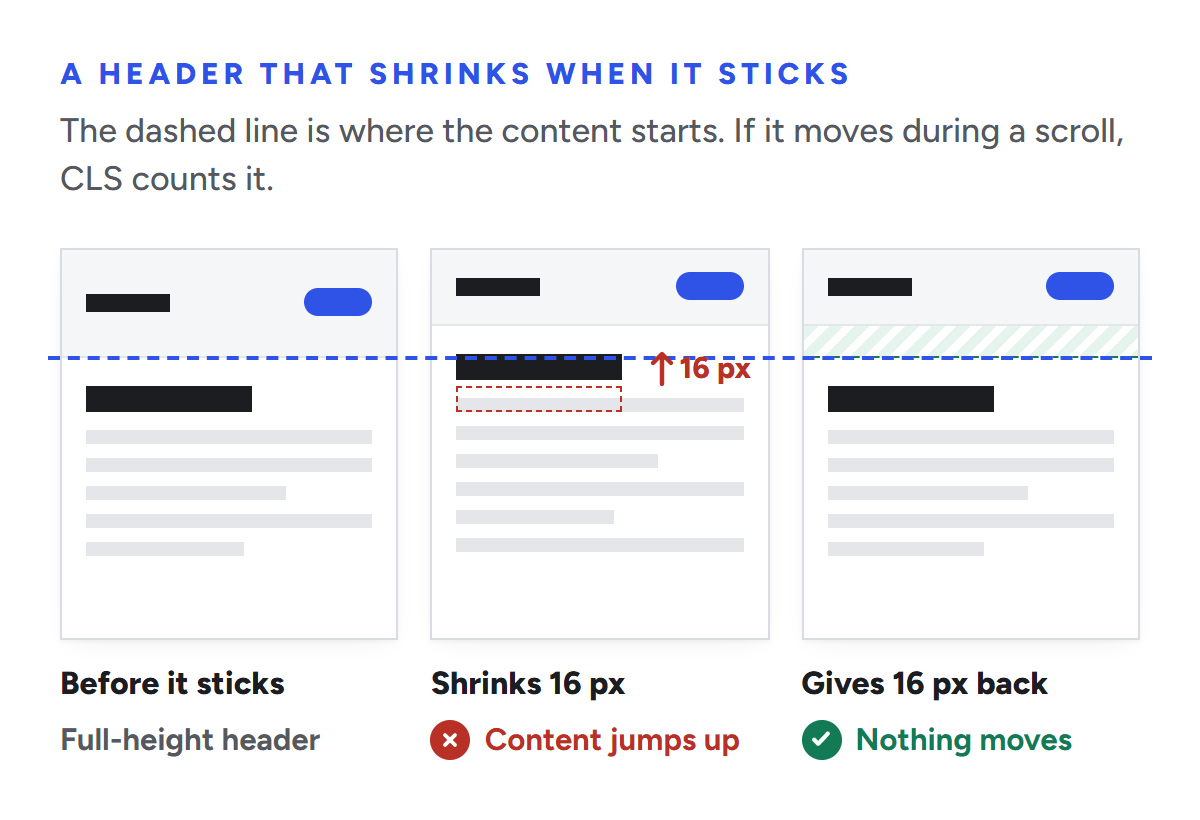
Sticky headers that change height when they stick. If the header shrinks and nothing fills the gap, everything under it jumps up.
Banners and "load more" blocks inserted above whatever the reader is looking at.
Scroll effects built by animating top, margin or height.
The fix for animations is in the same document: use transform: scale() instead of changing height and width, and transform: translate() instead of moving top or left. Lighthouse makes the same point from the performance side. Its non-composited animations audit warns that these animations "can appear janky (not smooth) on low-end phones" and "can also increase the Cumulative Layout Shift (CLS) of your page."
Our own site header shrinks by 16 pixels when it sticks to the top of the screen. It gives those 16 pixels back as space underneath itself over the same 300 milliseconds, so the content below never moves. When we tracked the blog's main heading through the shrink, its position on the page moved by 0.03 pixels. That small piece of CSS is what keeps a shrinking header out of a CLS score.
Shrink a sticky header and the content under it moves, which CLS counts. Give the lost height back as space and nothing moves.
2. The same busy main thread fails INP
INP ignores the scroll itself, but not what the scroll costs. A scroll handler that runs on every event, reads the layout and writes styles keeps the main thread busy, and when the reader then taps a menu or a filter, that tap waits in line behind it.
redBus, the Indian bus ticketing site, hit exactly this. In its case study on web.dev, the team debounced its scroll event handler "to reduce the amount of times the event callback would fire," and as a result "the main thread was able to respond more quickly to user interactions on the search page." Together with the rest of its INP work, that helped redBus increase sales by about 7%. The Economic Times brought its INP down from over 1,000 milliseconds to 257 and reported a 50% drop in bounce rate on topic pages (case study).
Mobile is where this bites. According to the 2025 Web Almanac, 97% of desktop websites have good INP but only 77% of mobile websites do, and only 48% of mobile websites pass all three Core Web Vitals.
3. Content that waits for a scroll may never get indexed
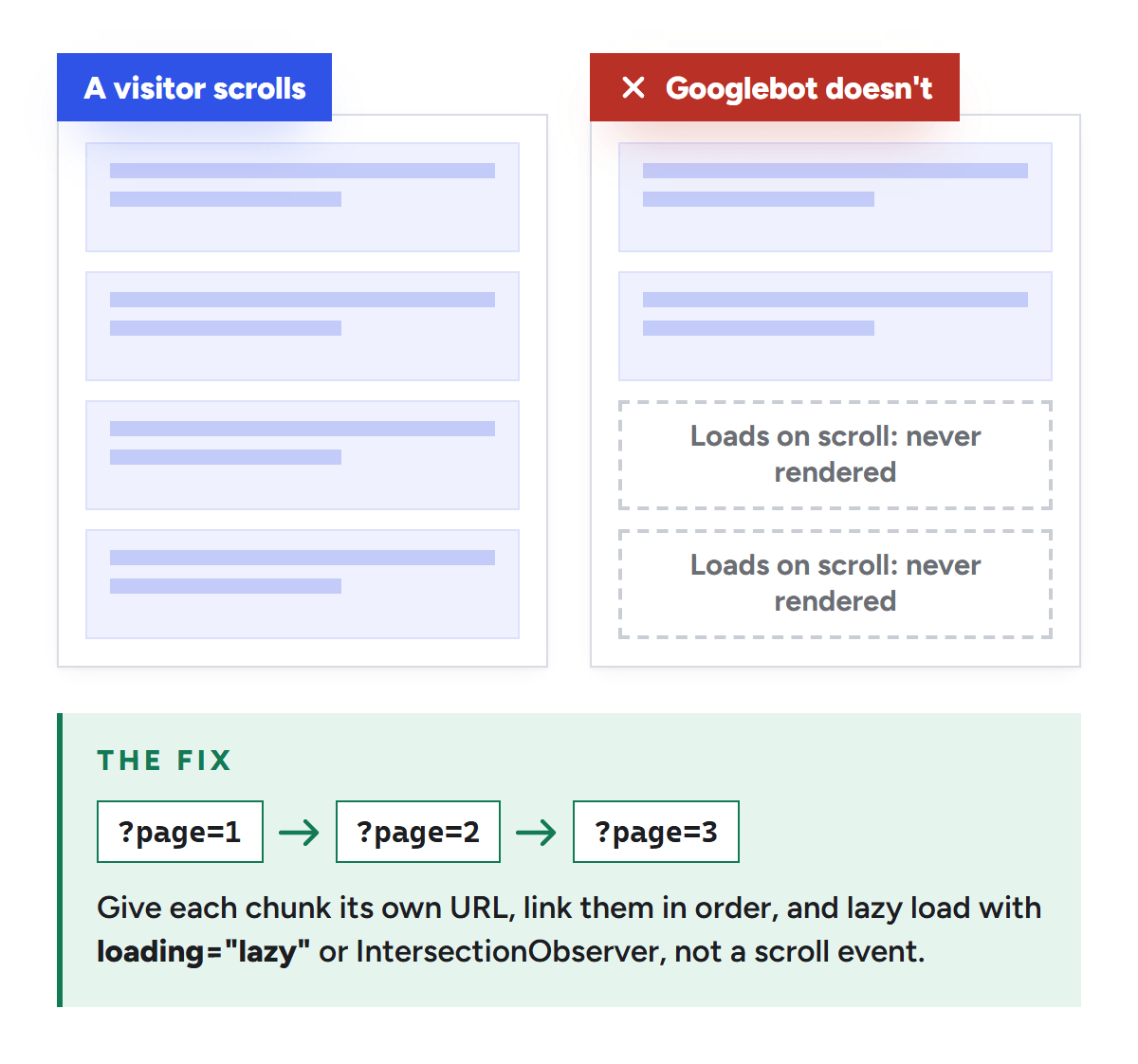
This is the one with a direct cost. Google's guidance on lazy-loaded content says it in one line: "Google Search does not interact with your page." Googlebot doesn't scroll and doesn't click, so content that only loads in response to a scroll event can be missing from the page Google renders.
The same page lists the safe ways to lazy load: the browser's built-in loading="lazy" for images and iframes, or the IntersectionObserver API, both of which load content as it comes into view rather than waiting for a scroll event. For infinite scroll, give every chunk of content its own permanent URL with an absolute page number (Google's example is ?page=12), link those pages to each other in order, and update the address bar with the History API as new chunks load.
Googlebot doesn't scroll, so content that waits for a scroll event can be missing from the page Google renders.
Then check it. The URL Inspection tool in Search Console shows the HTML Google rendered, so you can confirm the content is really there.
The indirect cost: people leave pages that fight them
Rankings aren't the only thing jank touches. Google's How Search Works pages say it uses "aggregated and anonymized interaction data to assess whether search results are relevant to queries." Google doesn't say how, and nobody outside Google can tell you how much a stuttering page moves that data. We won't pretend otherwise.
What is well documented is that speed changes what people do. In Deloitte's Milliseconds Make Millions study for Google, a 0.1 second improvement in mobile site speed lifted retail conversions by 8.4% and travel conversions by 10.1%, and improved the bounce rate on lead generation pages by 8.3%. That study measured load speed, not scroll smoothness, so treat it as a direction rather than proof. The Chrome team's smoothness paper describes the human side well: "A single dropped frame may not be very observable, but a sequence of many dropped frames affecting smoothness in a row sure is!"
For a B2B site the stakes are specific. Your best organic visitors read long pages: guides, comparisons, pricing, the demo page. If those pages feel heavy, people skim and leave before they reach the part that would have earned a call.
What we found when we measured our own blog
Back to our laggy blog page. A day of frame-by-frame testing turned up three things, and together they're a good example of how easy jank is to miss and how easy it is to blame the wrong thing.
Our setup: a script drove a Chromium browser (Chrome and Microsoft Edge use the same engine), scrolled the page the way a mouse wheel would, and recorded how long every single frame took. Then we changed one thing and ran it again.
A 42 ms frame is the size of the freeze we measured on the first scroll of our blog page. On a 60Hz screen it means two dropped frames. On a 120Hz phone it's closer to four.
Finding 1: a fast computer hides the problem
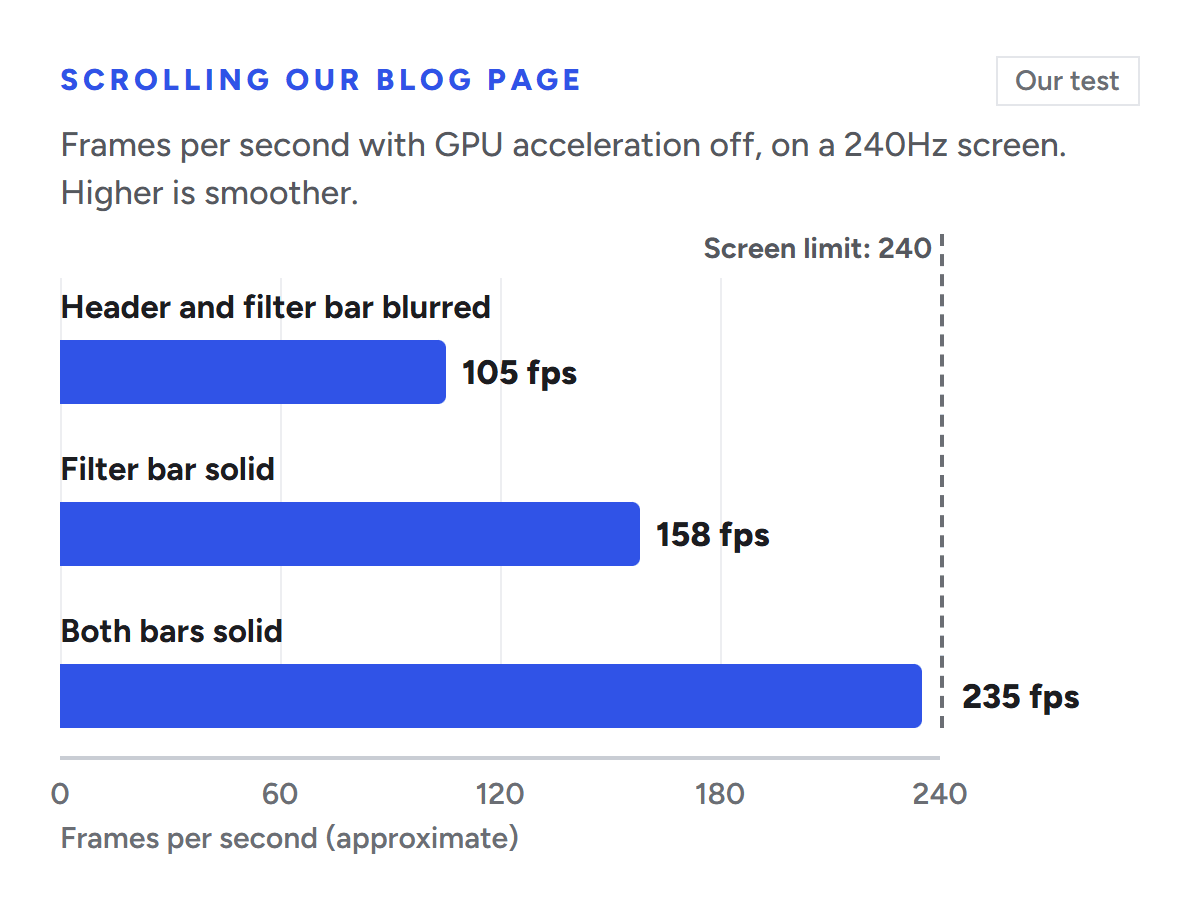
The desktop where the lag was first noticed has a high-end graphics card and a 240Hz monitor, and our first round of tests on it showed almost no dropped frames. So we switched off the browser's GPU acceleration, a rough stand-in for a cheaper laptop or a phone. Now the blog page scrolled at about 105 frames per second on a screen that can show 240.
The cause was two sticky bars, the site header and the blog's filter bar, each with a 16 pixel backdrop-filter: blur(). A blur behind a sticky bar has to be worked out again on every frame of a scroll, because the content underneath it keeps changing. Our bars were 92% to 95% solid white, so the blur was almost invisible anyway. Removing the filter bar's blur took the page to about 158 frames per second. Making both bars plain white took it to about 235, the screen's full rate, and the page looks the same.
Our test: taking the blur off both sticky bars took the blog page from about 105 to about 235 frames per second.
Finding 2: the lag wasn't where it looked
The lag felt like it came from the header shrinking as it stuck to the top. It's an easy thing to blame, and we nearly started rewriting the header.
Instead we built a control: a version of the page where the header doesn't change at all when it sticks. Same height, same logo, no shadow. On the first scroll in a freshly opened browser, that version froze for about 42 milliseconds, the same as the real one. The header was innocent. The freeze just happened at the same moment, about 50 milliseconds into a scroll, which is exactly when our header sticks.
The real cost was the browser drawing the rest of the page for the first time. The biggest single piece was a faint dotted background behind a call-to-action band near the bottom of the page. It was drawn with a repeating CSS radial-gradient, which means one small gradient for every 24 pixel square across the whole band. We redrew the dots as a single tiny SVG used as a mask. In screenshots at twice normal resolution, the new dots matched the old ones to within 2 out of 255 on every pixel, and the first-scroll freeze dropped from about 42 milliseconds to about 30.
Finding 3: none of it would have shown up in Core Web Vitals
Neither problem moved any content, so neither touched CLS. Neither involved a click or a tap, so neither touched INP. If we had waited for Search Console to flag something, we would have waited forever. That's the practical lesson: Core Web Vitals catch some of the damage that jank's causes do, not the jank itself. You have to go looking for it.
Common causes of scroll jank, and how to fix each
Cause
Why it stutters
Fix
Core Web Vital at risk
Scroll handlers that do real work on every event
The main thread is busy on every frame of the scroll
Debounce or throttle them, use IntersectionObserver to react to elements coming into view, or use CSS scroll-driven animations, which can run off the main thread (Chrome 115 and later)
INP
Animating height, top or margin (shrinking headers, homemade parallax)
The layout is recalculated on every frame
Animate transform and opacity instead, or compensate the change so nothing below moves
CLS
Backdrop blurs and filters on sticky or fixed bars
The blur is recalculated on every frame
A solid or nearly solid background
None. It just feels slow.
Repeating CSS gradient patterns and large blurred shadows
Expensive to paint the first time they scroll into view
A small image or SVG for patterns, modest shadows
None. It just feels slow.
Images, ads and embeds without reserved space
They push content down when they load in the middle of a scroll
width and height attributes, aspect-ratio, fixed-height ad slots
CLS
Touch and wheel listeners that aren't passive
The browser waits for the listener before it scrolls
Add { passive: true }. Mostly a problem in older code and third-party scripts now.
None directly
Heavy third-party scripts (chat widgets, session replay, piles of tags)
They compete with your page for the main thread
Load them after the page, or on interaction, and remove the ones nobody uses
INP
Very long pages with a huge DOM
The browser does rendering work for content nobody can see yet
content-visibility: auto on sections below the fold
INP
Two of those fixes deserve a word. CSS scroll-driven animations shipped in Chrome 115, and Chrome's documentation says they let you have "silky smooth animations, driven by scroll, running off the main thread" (Chrome for Developers). If your site still moves things with a JavaScript scroll listener, that's often the single biggest win. And content-visibility: auto tells the browser it can skip rendering sections that are off screen until they're about to appear. In web.dev's example, a long travel blog rendered 7 times faster on first load, from 232ms to 30ms (web.dev).
How to measure scroll jank properly
Watch the frames live. In Chrome DevTools, open the Rendering panel and turn on Frame rendering stats. You get a live frame rate and a timeline that marks each frame as rendered (blue), partially presented (yellow) or dropped (red). Scroll and watch for red.
Find scroll-blocking listeners. The same panel has a Scrolling performance issues option that highlights elements with scroll-related event listeners that may slow the page down.
Record with the brakes on. In the Performance panel, set CPU throttling to 4x or 6x, record a scroll, and look for long frames. A fast laptop with no throttling will tell you everything is fine. Ours did.
Catch it in the field. The Long Animation Frames API, available since Chrome 123, reports frames whose rendering was delayed beyond 50 milliseconds. Chrome's documentation notes that long frames "can still affect smoothness and lead to a feeling of a laggy user interface for scrolling or animations, even if these are less of an issue for responsiveness as measured by INP." Send those entries to your analytics and you'll see jank on your visitors' real devices.
Check Google's view. Search Console's Core Web Vitals report shows CLS and INP from 28 days of real visits. Use it to watch the SEO side, knowing it won't show the jank itself.
Use a control. When something feels slow at a particular moment, build a version without the suspect and test both. It saved us from rewriting a header that wasn't the problem.
Frequently asked questions
Is smooth scrolling a Google ranking factor?
Not on its own. None of the three Core Web Vitals measures smoothness, and Google's smoothness metric is still experimental. What Google measures is loading (LCP), responsiveness to clicks, taps and key presses (INP) and visual stability (CLS).
Does INP measure scrolling?
No. Google's documentation says hovering, zooming and scrolling are not observed for INP. But a page that does heavy work while scrolling can make the next tap or click slow, and INP does measure that.
Can a sticky header hurt CLS?
Yes, if it changes size in a way that moves the content below it. Layout shifts during a scroll count toward CLS, because scrolling isn't treated as recent input. Keep the header's height fixed, animate it with transform, or give back any height it loses as space underneath so nothing moves.
Does infinite scroll hurt SEO?
It can. Googlebot doesn't scroll, so content that only appears after scrolling may not be indexed. Give each chunk of content its own URL with a page number, link those pages in order, and check the rendered HTML with Search Console's URL Inspection tool.
Does PageSpeed Insights measure scroll jank?
Not really. Its lab test measures a page load, not a scroll, so a good score says little about how the page feels to scroll. It does flag related problems, such as non-composited animations. The field data at the top of the report shows CLS and INP from real Chrome users.
Should we just remove our animations?
No. Animate transform and opacity, which the browser can handle without redoing the layout, respect the prefers-reduced-motion setting, and test on a mid-range phone. Most animations are fine. The ones that hurt are the ones that change layout or force a repaint on every frame.
Want us to look at your site?
Scroll jank is rarely the reason a page doesn't rank. It's often a sign of the problems that do cost you: layout shifts, a crowded main thread, content Google can't see. Our technical SEO work covers all of it, and we do it for B2B SaaS companies in particular. Book your free strategy call: 30 minutes with a senior consultant, not a sales rep.
We’re a B2B SEO and AEO agency. Book a free 30-minute call with a senior consultant: we look at your site before we talk, so you leave knowing what to fix first.

 best project management software